The document can wait
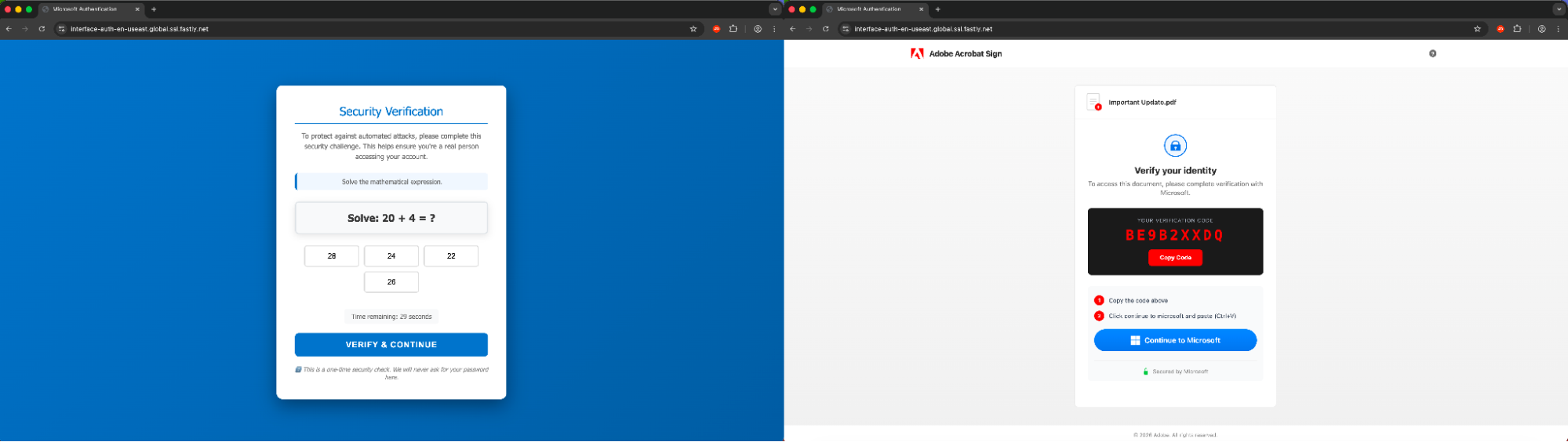
You open a file someone appears to have sent you. Before it loads, a verification screen interrupts — copy this code, then continue to Microsoft. It feels like one more security check standing between you and the document. That's the design.
Here's the part worth pausing on: a device code links a sign-in you're doing right now to a client waiting somewhere else, on someone else's machine. In a phishing flow, that waiting client belongs to whoever built the lure. You're not signing into your document. You're signing that document's author's application into your account.
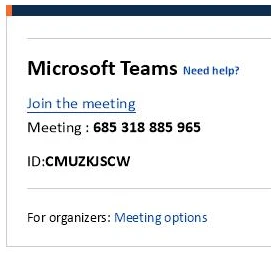
Microsoft found meeting invitations that presented the code as a Teams meeting ID. Push Security separately documented document-themed campaigns with verification gates dressed up as Microsoft popups. Two different operators, two different disguises, the same mechanism underneath. Microsoft's investigation; Push Security's campaign examples.
How the journey unfolds
The first message can arrive almost anywhere — email, Teams, a text, a phone call, a QR code stuck to something. Whatever carries the link onward next — a PDF, an HTML attachment, a Word doc, an SVG, a spreadsheet — mostly matters to investigators after the fact. What matters to you in the moment is simpler: what is this next screen actually asking me to do?
- A document or branded landing page offers you something you were expecting — a file, a meeting, a signature request.
- A CAPTCHA or verification gate adds a small extra step. (Campaigns also quietly filter who even gets this far.)
- Behind the scenes, the backend requests a fresh device authorization code. The short code you'll see is generated for that one transaction.
- A "Copy Code" button puts it on your clipboard. Some versions even try to populate it automatically, if your browser lets them.
- A popup or redirect opens Microsoft's real device authentication page.
- You paste the code and sign in normally — MFA and all.
- The client that started this whole thing receives your OAuth tokens the moment authorization succeeds.
Static illustration · No interactive controls
Document signature requested
Verify your identity to continue
Continue to Microsoft →
The order shifts from kit to kit — sometimes a new window, sometimes a redirect, sometimes a caller talking someone through it step by step on the phone. Whatever the packaging, the authorization always flows back to the same place: the client that started the transaction.
What the code actually connects
The OAuth Device Authorization Grant exists for a real reason — it lets apps sign in on devices that can't easily handle a login form, like a smart TV or a command-line tool. It separates your side of the interaction (the browser, the sign-in) from the application actually waiting on the other end.
Two separate codes get issued here, and the distinction is the whole story: a short user_code, meant for you, and a device_code, which the client keeps for itself. That client sits there polling the token endpoint while you sign in. The moment you approve it, it gets an access token — and depending on the request and your organization's policy, a refresh token too, good for staying signed in well beyond that one session. Microsoft's protocol documentation.
- 1 · Initiating client
An operator kicks off a device authorization flow.
- 2 · Code supplied to the reader
A lure delivers the short user code to you. The client quietly holds onto the separate device code.
- 3 · Genuine identity service
You enter the code and complete sign-in, MFA included.
- 4 · Polling client receives tokens
The original client, which has been checking in the whole time, gets its tokens the moment you're authorized.
Picture the code as a wire strung between two rooms. You can only see your own room — the sign-in, the MFA prompt, the familiar Microsoft page. Whoever generated the code controls the other one. Even a familiar, legitimate-looking app name on your screen only tells you which software is being used. It tells you nothing about who's actually sitting on the other end of that wire.
There's a real distinction hiding in here, and it's worth holding onto: authentication proves who you are. Authorization decides what a piece of software gets to do with that proof. Nothing about this attack breaks authentication — Microsoft genuinely confirms it's you. What it breaks is your reason for granting authorization, and your awareness of who's receiving it.
The Microsoft screen is genuine — that's what makes it work
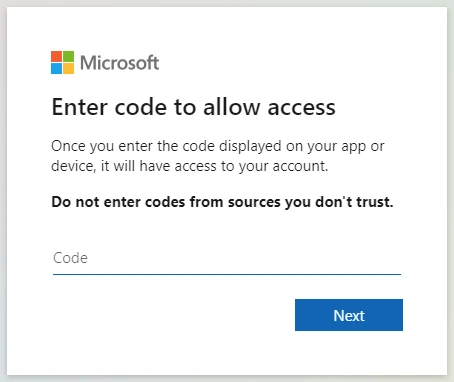
A real domain. A real MFA prompt that actually succeeds. Both can be true here at the same time as the theft. Authentication is doing exactly what it was built to do — confirming it's you — while you unknowingly authorize a transaction someone else started.
Even a security key or a passkey won't save you from this one, and that's worth sitting with for a second. They bind your login to the real Microsoft service — which is exactly where you are. The problem was never where you signed in. It's why the sign-in was happening at all.
So before you enter a code anywhere, ask yourself one plain question: "What did I just do that should have generated this?" A code from an app you deliberately opened has an answer to that question. A code that showed up because of a document, a message, or a phone call from someone else does not — and that gap is the warning.
What access can actually follow
What an attacker gets from this depends on the client, the scopes granted, your account's privileges, and whatever controls your organization has in place. Tokens for Microsoft Graph can unlock real cloud operations within those scopes. Refresh tokens can keep that access alive well past the original sign-in, until something expires, gets revoked, or policy catches up to it.
In the Storm-2372 investigation, Microsoft found attackers searching mailboxes, collecting emails, and sending fresh phishing messages from the accounts they'd just compromised. Which means a "convincing message from a colleague" might not be a new attack at all — it might be the second stage of an old one. Campaign findings.
If you're investigating one of these, the application identity, resource, scopes, timestamps, and sign-in context will tell you far more than the original document ever will.
If you entered the code
Report it now, through your organization's actual security channel — not later, not after you've tried to figure out how bad it is yourself. Hold onto the original message, the document, the destination URL, and roughly when it happened. Don't paste live codes or tokens into a chat while you're explaining what happened; that just hands over the second thing along with the first.
Tell whoever responds, plainly, that you completed a device-code flow. They'll need to revoke sessions and refresh tokens, check recent sign-ins and app activity, and look at what your mailbox and cloud access were used for. A password reset might be part of this — but on its own, it isn't enough. The tokens and sessions need to be dealt with directly.
How fast revocation actually takes effect depends on the resource and token type — some access tokens keep working until they naturally expire or something actively enforces revocation. Someone should be watching afterward, not just cleaning up once. Microsoft's access-revocation guidance.
If you're the one managing this for others: Conditional Access can restrict device-code sign-in outright. Find your legitimate use cases first, test any policy in report-only mode before you enforce it, and carve out narrow, deliberate exceptions where the business genuinely needs them. Conditional Access authentication-flow controls.
And the next time an unexpected file request shows up: open your document tool the normal way, from your own bookmark, and go find the file there yourself. Confirm anything unusual with the sender through a channel you already trust. It costs you a minute. It gives the sign-in a reason you can actually account for.
Keep reading
Compare this with how AiTM phishing captures a session instead of a token, revisit what modern phishing has in common across techniques, or learn how browser state connects to account access.