In this article
On 26 September 2026, we opened safeherinitiative[.]online expecting one more fake Microsoft sign-in page. The root of the site served something far more revealing: the attacker's own dashboard, titled Device Code Capture Panel, sitting in public view.
From that panel, an operator could generate device codes and lure pages, list live lures, flip a campaign kill switch, watch captured sessions arrive, preview access-token data and hand a stolen token to a function that turns it into Microsoft session cookies. The page's source code pointed to a backend on Cloudflare Workers with a name that needs little explanation: eviltokens-edge.lumeragreen.workers[.]dev.
The timing gives that name extra weight. On 22 September, Microsoft published its research on EvilTokens, a phishing-as-a-service platform built around device-code phishing, and announced a coordinated disruption of the service's infrastructure. The certificates behind this panel became valid about two days later.
Who runs this deployment, and how it relates to the platform Microsoft disrupted, remains an open question. This article documents what the deployment does, how it was staged, and why it works on careful, security-aware people.
The short version
- The lure looks like a Microsoft sign-in page. It ignores the email address you type, fetches a short-lived device code, helps you copy it, and sends you to Microsoft's genuine device login page.
- Your password and MFA prompt happen on Microsoft's real site. What you approve there is a session the attacker started.
- Wildcard DNS and a wildcard certificate let the kit invent a fresh subdomain for every lure with zero extra setup.
- The backend listed its live lures to anyone who asked, with no authentication and wide-open CORS.
- Organizations with no use for the device code flow can block it with Microsoft Entra Conditional Access, which is also Microsoft's own recommendation.
What we did, and what we left alone
We kept the investigation passive and read-only. We viewed the panel page and its source, retrieved one existing lure as HTML without running its JavaScript, made a single unauthenticated read of the backend's lure list, and collected DNS, TLS and certificate transparency (CT) data.
We left every control untouched. We did not use the kill switch, create or delete lures, start OAuth sessions, request the captured-session feed that could contain victim tokens, or call the cookie generator. The limitations section at the end spells out what this approach could and could not reveal.
All times in this article are UTC. Indicators are defanged: replace [.] with . before using them.
An operator panel in plain sight
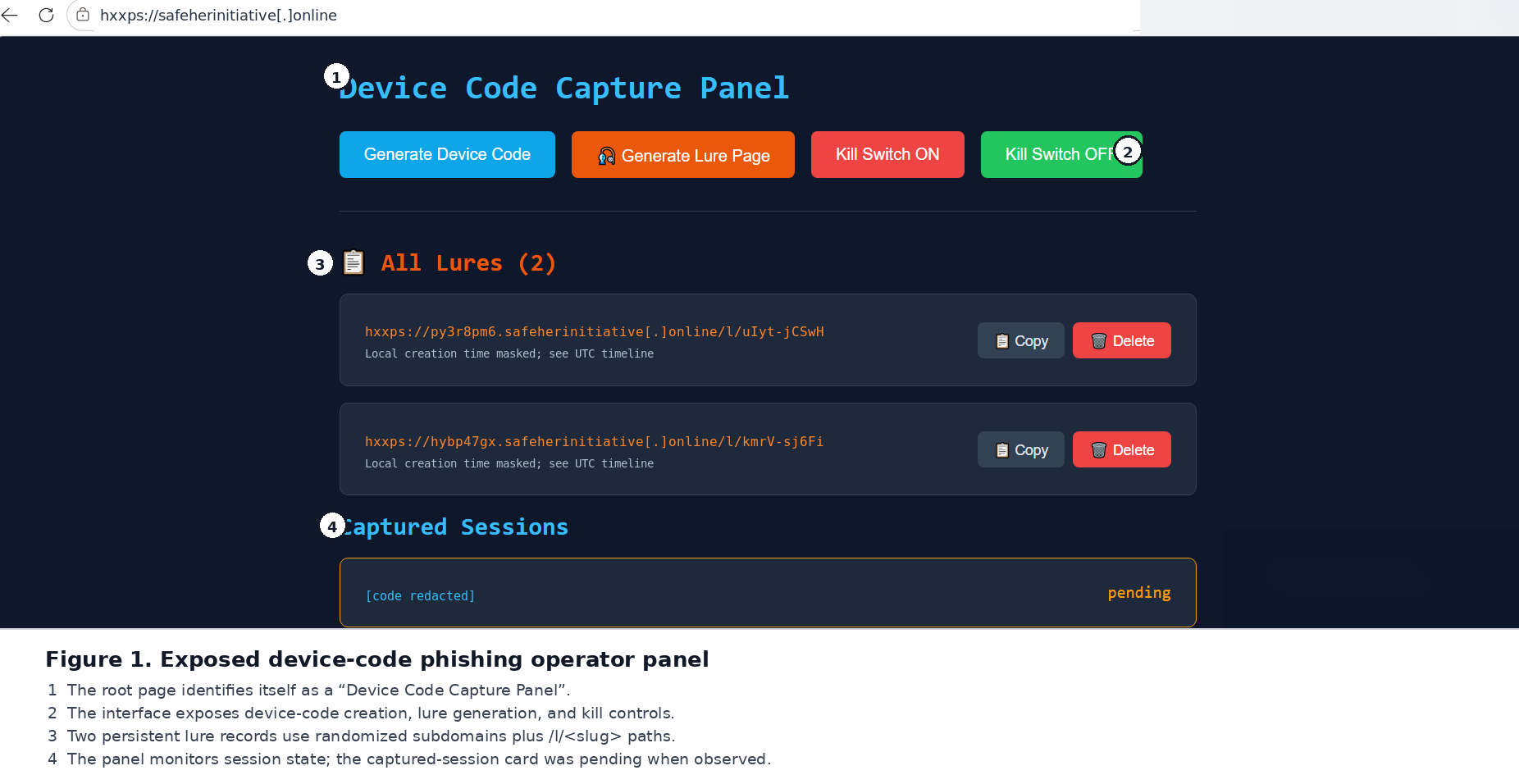
Figure 1. The exposed operator panel as captured during the investigation. We masked browser toolbar icons, an operating-system watermark and the lure creation times, which the panel displays in the viewer's local time. The UTC creation times appear in Figure 3.
Four buttons sat at the top of the page: Generate Device Code, Generate Lure Page, Kill Switch ON and Kill Switch OFF. Below them, the panel listed two lures, each on a random-looking subdomain with a random /l/<slug> path. A Captured Sessions section held one device-code session marked pending.
The source code showed that every one of those buttons was wired up. The panel sent its requests to the Cloudflare Workers backend through these routes:
GET /api/luresPOST /api/lureDELETE /api/lure/delete/<slug>POST /api/initGET /api/statusPOST /api/cookiesPOST /api/killPOST /api/unkill
Every ten seconds, the panel polled /api/status for session records. Each record could hold the user code, the capture status, the capture time, the last token refresh, a refresh count and a preview of the access token. In plain terms, the dashboard was built to tell its operator which victims had approved a sign-in, and whether their tokens were still being refreshed.
A separate Cookie Generator accepted an access token and described its job as exchanging that token for session cookies across Microsoft services. We did not call it.
A sign-in page that ignores your email address
We retrieved one of the existing lures as raw HTML and read it without executing any code.
At first glance it looks like the Microsoft sign-in page millions of people see every day: the four-colored logo, the Sign in heading, an Email, phone, or Skype field, the familiar links and a blue Next button.
The JavaScript tells a different story. The script never reads the email field. Clicking Next hides the email section, reveals a device-code section and requests:
/api/lure/code/<slug>
The response carries at least a user_code and an expires_in value. The page displays the short code, enables a Copy code button and offers Open Microsoft Login, which opens Microsoft's genuine page at microsoft.com/devicelogin.
So the email step is stagecraft. It puts the visitor in a "signing in to Microsoft" frame of mind, then hands them a code and walks them to the real Microsoft page to enter it.
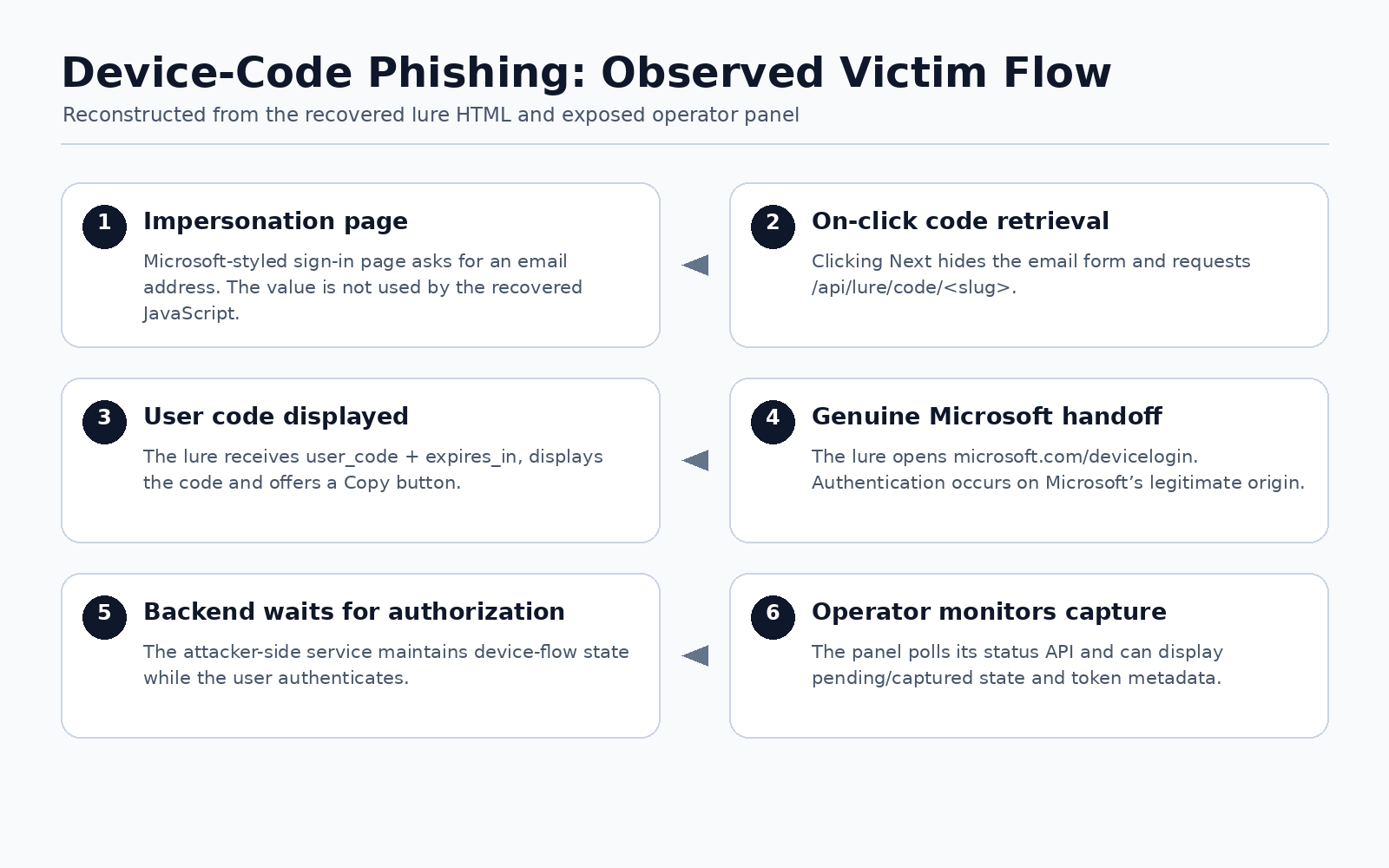
Figure 2. The victim's path, reconstructed from the recovered lure source and the panel. Step 5 is inferred from the design, since we did not inspect the backend.
Every sensitive step happens on Microsoft's own site. The recovered client-side code has no password form, credential submission or adversary-in-the-middle proxy to find. That is exactly what makes the technique so convincing. A careful user can check the address bar, see a genuine Microsoft domain, complete their usual MFA prompt, and still end up approving a session someone else started.
Why this works on careful people
Microsoft's OAuth device authorization grant exists for devices with awkward keyboards or no browser at all: smart TVs, printers, conference-room equipment. The device asks Microsoft for a code, shows you a short version of it, and waits. You visit Microsoft's verification page on your phone or laptop, type the code and sign in. Meanwhile the device keeps checking with Microsoft until your approval comes through, and then it receives its tokens.
In normal use, the device waiting on the other end belongs to you or your organization.
In device-code phishing, the attacker's server plays the part of that device. It starts the request, delivers the code to you through a lure, and waits. When you approve, Microsoft issues the tokens to whoever started the request. Your password never passes through the attacker's hands, and it doesn't need to.
If you have ever signed in to a streaming app on a TV this way, the steps feel familiar and harmless. That familiarity is the attack. Someone who falls for it has behaved sensibly: they entered a code on a real Microsoft page, which is precisely what the flow asks of them.
Microsoft's EvilTokens research describes the same abuse at industrial scale: live device codes generated the moment a victim opens the page, a copy-code button, a redirect to microsoft.com/devicelogin, and a script that keeps polling for approval during the code's 15-minute lifetime. The deployment we observed follows the same pattern.
A backend that answered anyone
The panel hard-coded eviltokens-edge.lumeragreen.workers[.]dev as its API base, and that Worker accepted cross-origin requests from anywhere:
Access-Control-Allow-Origin: *Access-Control-Allow-Headers: Content-TypeAccess-Control-Allow-Methods: GET, POST, DELETE, OPTIONS
A preflight request from an unrelated origin received the same permissive answer.
More telling, an unauthenticated GET /api/lures returned live lure metadata. The backend exposed two persistent lure records, complete with creation timestamps, which confirmed that lure state lived on the server:
hybp47gx.safeherinitiative[.]online/l/kmrV-sj6Fipy3r8pm6.safeherinitiative[.]online/l/uIyt-jCSwH
We chose to leave /api/status alone, because the panel's source showed it could return captured access-token data. Even so, a frontend with no visible authentication and a backend with wide-open CORS make a striking combination for a tool whose whole purpose is holding stolen tokens.
Built for disposable subdomains
DNS and TLS showed how the kit produces a fresh-looking hostname for every lure.
Both lure subdomains resolved to the same Cloudflare anycast addresses as the apex domain. So did a hostname we invented on the spot under safeherinitiative[.]online, which confirmed that wildcard DNS was in place.
TLS completed the picture. The frontend's current certificate covered safeherinitiative[.]online and *.safeherinitiative[.]online, and both lure hosts presented that same wildcard certificate. The backend namespace presented its own wildcard certificate for lumeragreen.workers[.]dev and *.lumeragreen.workers[.]dev.
With wildcard DNS and a wildcard certificate in place, the lure generator can mint a new subdomain for each campaign URL instantly, with no new DNS records and no new certificates. For defenders, that means blocking one lure hostname achieves very little.
Two days after the takedown was announced
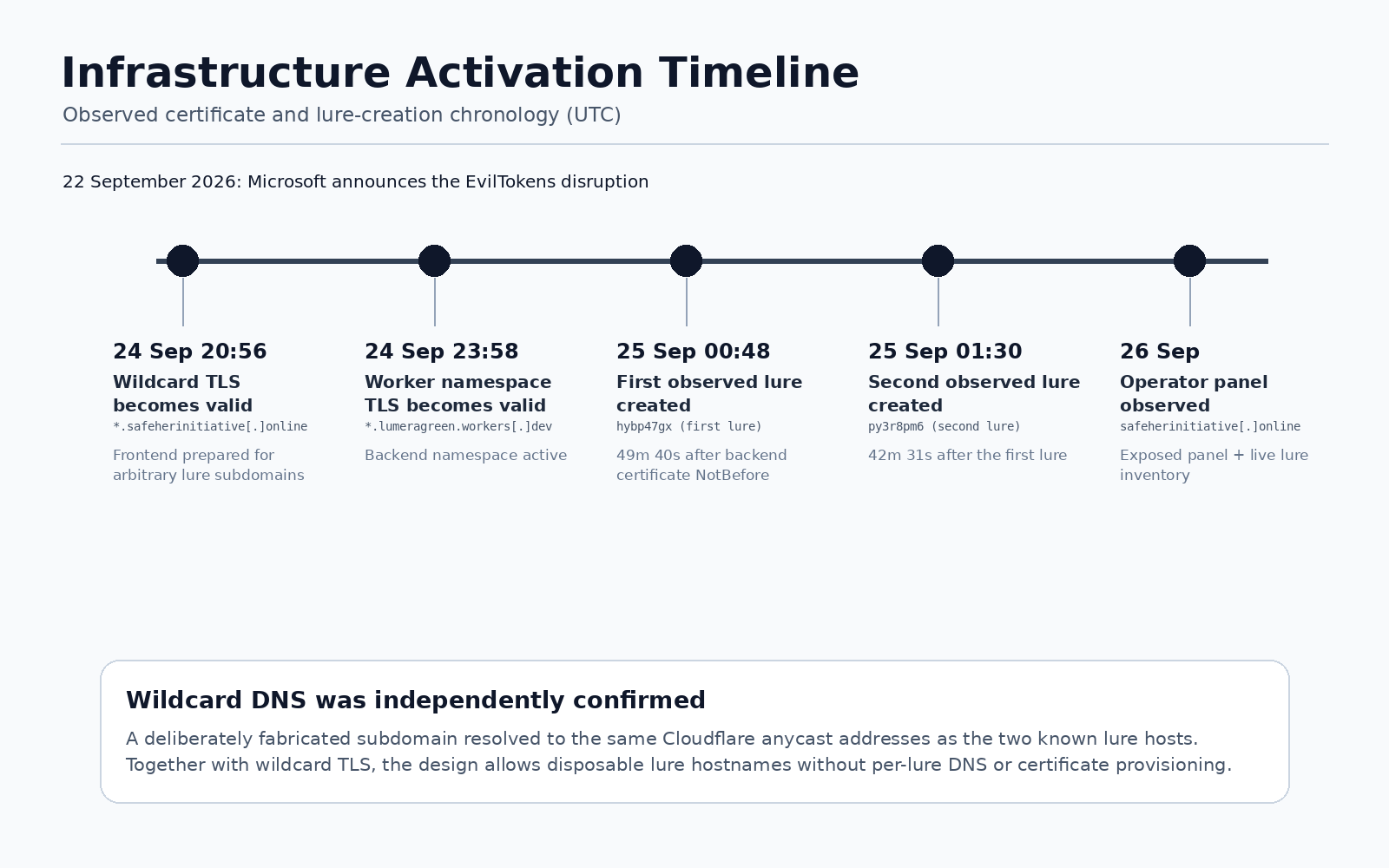
Figure 3. Certificate validity and lure creation times, alongside Microsoft's announcement.
The certificate history lines up tightly with the lure records, and with Microsoft's announcement.
The earlier safeherinitiative[.]online certificates in public CT data covered only the apex and www. On the evening of 24 September, the live site presented a new certificate covering the apex plus a wildcard. That apex-and-wildcard pair is typical of the certificates Cloudflare provisions automatically, so the change is consistent with the domain being placed behind Cloudflare that evening.
About three hours later, the current wildcard certificate for the lumeragreen.workers[.]dev namespace became valid. The first lure record appeared less than 50 minutes after that.
| Time (UTC) | Event |
|---|---|
| 2026-09-22 15:00 | Microsoft publishes its EvilTokens research and announces a coordinated disruption |
| 2026-09-24 20:56:19 | *.safeherinitiative[.]online certificate becomes valid |
| 2026-09-24 23:58:27 | *.lumeragreen.workers[.]dev certificate becomes valid |
| 2026-09-25 00:48:07 | First observed lure created (hybp47gx) |
| 2026-09-25 01:30:38 | Second observed lure created (py3r8pm6) |
| 2026-09-26 | Exposed operator panel observed |
A certificate's start date shows when the certificate became usable. That makes it strong timing evidence, and still indirect evidence of when the phishing application itself went live. Read together, though, these timestamps show frontend and backend infrastructure being prepared in the hours right before the exposed lures appeared, roughly two days after Microsoft went public with its disruption.
The newest certificates also carried embedded Signed Certificate Timestamps, which show they were submitted to CT logs. Their absence from our crt.sh searches at the time is best read as an indexing delay.
How this relates to EvilTokens
The backend's name, eviltokens-edge, is hard to miss, and the behavior we observed overlaps heavily with Microsoft's description of EvilTokens:
- abuse of Microsoft's device code flow;
- device codes generated on demand and shown to the victim;
- a copy-code button and a handoff to the genuine
microsoft.com/devicelogin; - a backend on Cloudflare Workers, one of the deployment options Microsoft says the EvilTokens panel offered its subscribers;
- operator-side monitoring of captured sessions;
- token-focused handling after approval, including refresh tracking and a token-to-cookie converter.
There are differences, too. Microsoft describes lure pages that poll a /state endpoint, and the endpoint names we recorded differ. A hostname is also trivial to choose: anyone can put "eviltokens" in a Worker name.
So we describe this deployment as EvilTokens-related, EvilTokens-derived, or operationally consistent with EvilTokens. Several explanations fit the evidence: a customer running a copy of the kit on their own infrastructure, someone rebuilding the service after the takedown, or an unrelated operator borrowing a notorious name. Telling these apart would take backend artifacts that we deliberately chose to leave uncollected.
That caution keeps a strong technical correlation from turning into an attribution the evidence cannot carry.
What conventional detection can miss
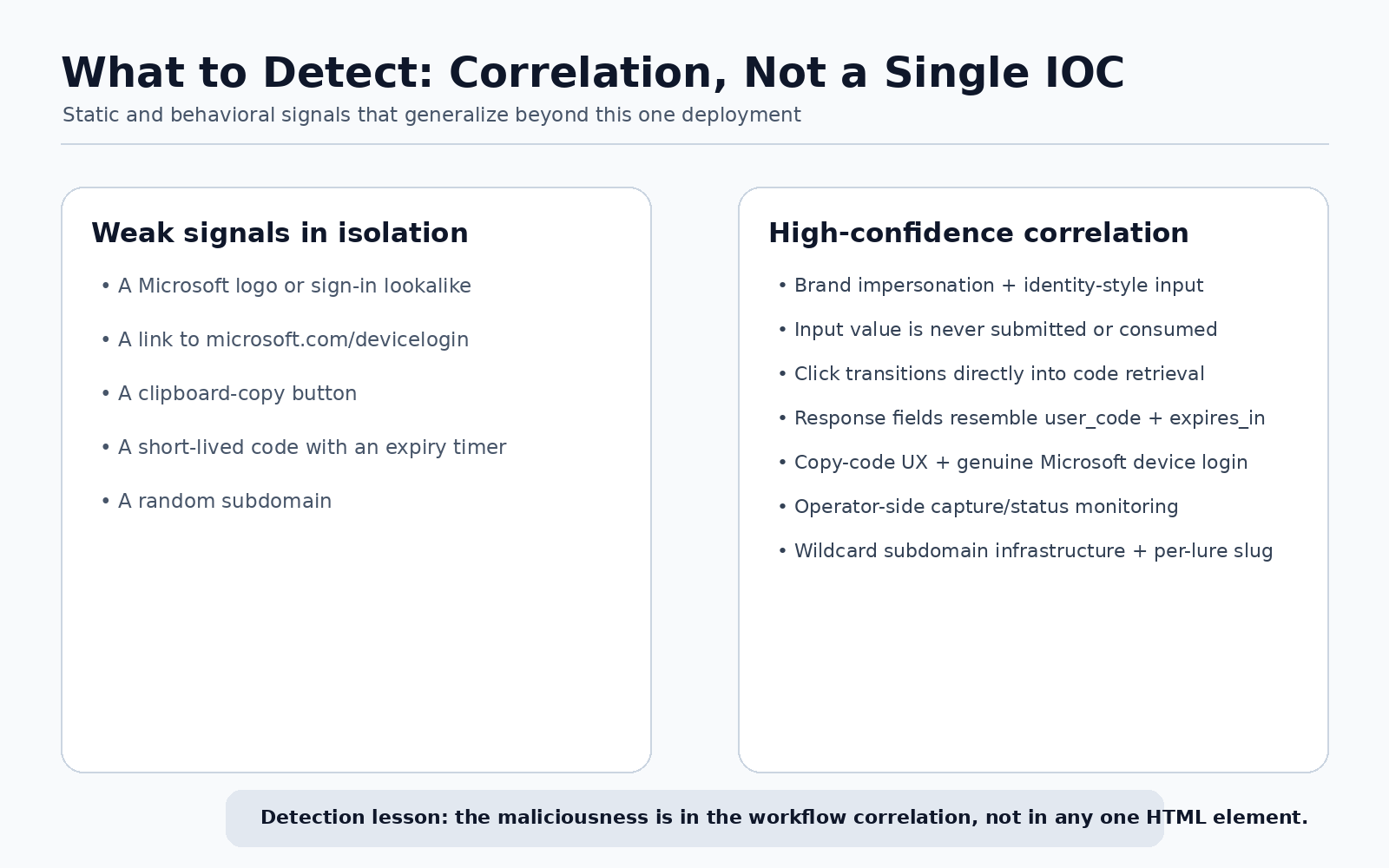
Figure 4. Signals that are weak on their own become strong when they appear together, in order.
Look at the lure's parts one at a time and almost nothing stands out. Microsoft branding, a link to microsoft.com/devicelogin, a copy-to-clipboard button, a short code with a countdown, a random subdomain: plenty of legitimate sites use every one of these.
The signal appears in the sequence. In the recovered lure, it ran like this:
- a Microsoft-styled identity page;
- an email field whose value is never used;
- a click that swaps the form for a device-code screen;
- a same-origin API call that returns
user_codeandexpires_in; - help copying the code to the clipboard;
- a handoff to Microsoft's real device login page.
Taken together, those steps make a far stronger detection signal than any single indicator. For browser protections and static analysis, device-code phishing is best treated as a workflow to recognize, with blocklists as a supporting layer.
What defenders can do
If your organization has no need for the device code flow, block it. Microsoft recommends doing so wherever possible, through a Conditional Access policy that targets authentication flows. Where the flow is genuinely needed, for example on Teams meeting-room devices, scope the exception tightly to those specific device accounts.
Where the flow stays enabled, watch for:
- device-code sign-ins by users or applications that don't normally use them;
- a new device registered shortly after a device-code sign-in;
- bursts of Microsoft Graph activity after the flow completes;
- mailbox searches or new inbox rules soon after a device-code sign-in;
- web pages that generate or copy a device code and then send the visitor to Microsoft's verification page.
If you find a compromise, move quickly. Microsoft notes that revoking a user's sessions invalidates refresh tokens while existing access tokens can stay usable for up to an hour, and it recommends temporarily disabling the affected account to contain hands-on attackers.
What to tell your users
Most phishing advice comes down to "check that the sign-in page really belongs to Microsoft." Against this attack, a careful user passes that check and still loses, because the page genuinely is Microsoft's.
A message that holds up better:
Only enter a device code when you started the sign-in yourself, on a device in front of you. If a code reaches you through an email, a website, a chat with "support" or a document, close the tab, even when the page asking for it is genuinely Microsoft's.
And if someone on your team did enter a code, meet them with understanding. They followed a real Microsoft process on a real Microsoft page. Recovery is fastest when people feel safe reporting a mistake the moment they notice it.
Indicators and research artifacts
Domains
safeherinitiative[.]onlinehybp47gx.safeherinitiative[.]onlinepy3r8pm6.safeherinitiative[.]onlineeviltokens-edge.lumeragreen.workers[.]dev
Lure URLs observed
hxxps://hybp47gx.safeherinitiative[.]online/l/kmrV-sj6Fihxxps://py3r8pm6.safeherinitiative[.]online/l/uIyt-jCSwH
API routes observed
/api/init/api/status/api/lure/api/lures/api/lure/code/<slug>/api/lure/delete/<slug>/api/cookies/api/kill/api/unkill
TLS certificates observed
Frontend wildcard certificate
- Subject:
CN=safeherinitiative[.]online - SAN:
*.safeherinitiative[.]online,safeherinitiative[.]online - SHA-1 thumbprint:
1C1E95C6170E55EB505318450074E357F402FFD9 - NotBefore:
2026-09-24 20:56:19 UTC
Worker namespace certificate
- Subject:
CN=lumeragreen.workers[.]dev - SAN:
*.lumeragreen.workers[.]dev,lumeragreen.workers[.]dev - SHA-1 thumbprint:
5BDD19CEA9C77FB5387B020B74A864DA261DEDDC - NotBefore:
2026-09-24 23:58:27 UTC
Cloudflare rotates certificates on infrastructure like this regularly, so treat these thumbprints as supporting evidence for correlation and keep durable blocking decisions for the domains and behaviors above.
Methodology and limitations
We stopped short of anything that could change the live service or expose victim authentication material. We did not:
- use the kill switch in either direction;
- generate or delete lures;
- start new OAuth sessions;
- retrieve the captured-session feed;
- submit access tokens;
- call the token-to-cookie function.
That restraint leaves several backend details unknown: the OAuth client_id, the requested scopes, the tenant authority, the exact device-code and token requests, how refresh tokens are stored, the backend's storage technology, and any post-capture Microsoft Graph or mailbox tooling.
We name those gaps on purpose. They mark the line between what we observed directly and what we infer.
Closing thoughts
What started as one suspicious domain exposed both ends of a device-code phishing operation. The panel showed how lures are made and victims tracked. The lure showed how little malicious code the attack needs in the browser. DNS and TLS showed how wildcards keep lure hostnames disposable. And the timeline showed the whole setup coming online within days of a major takedown announcement.
The lesson worth carrying away is simple: a genuine Microsoft sign-in page confirms where you are signing in. Only you can confirm who started the request.
Device-code phishing succeeds by getting people to authorize a session someone else began. That deserves more attention from browser defenses, identity monitoring and awareness programs alike.
References
- Microsoft Threat Intelligence, Microsoft Defender Experts and Microsoft Security Research, “Unmasking EvilTokens: Getting to the root of device code phishing”, Microsoft Security Blog, 22 September 2026.
- Steven Masada, Microsoft Digital Crimes Unit, “Disrupting EvilTokens: The AI Chatbot Built for Cybercrime”, Microsoft On the Issues, 22 September 2026.
- Microsoft Learn, “Microsoft identity platform and the OAuth 2.0 device authorization grant flow”.
- Microsoft Learn, Conditional Access guidance on blocking authentication flows.
- What Is My Web Info research, passive observations collected 26 September 2026.